All guides
No guide matches your search.
Pick dates with the date picker and calendar
Let users type or pick one date, set limits, mark busy days and show several months. A calendar on the form can also select a range of days.
On this page
Two controls work with dates. MxDatePicker is a box with a drop-down calendar. It lives in the Mordex.Windows.DatePicker namespace. MxCalendarView is a calendar that stays open on the form. It lives in the Mordex.Windows.Scheduler namespace.
Pick a single date
Value holds the date. DateFormat sets how the box shows it.
using System;
using Mordex.Windows.DatePicker;

MxDatePicker picker = new MxDatePicker();
picker.Value = DateTime.Today;
picker.DateFormat = DateFormat.Long;
picker.ShowTodayButton = true;
picker.ValueChanged += (sender, e) => Text = picker.Value.ToShortDateString();
Controls.Add(picker);| Value | What the box shows |
|---|---|
DateFormat.Short | The short date of the current culture. This is the default. |
DateFormat.Long | The long date of the current culture. |
DateFormat.Time | The time. |
DateFormat.DateTime | The date and the time. |
DateFormat.Custom | The pattern in CustomFormat. |
picker.DateFormat = DateFormat.Custom;
picker.CustomFormat = "dd MMM yyyy";
ShowTodayButton shows a Today button in the drop-down. It is on by default. TodayButtonText changes its text.
Note
The picker reads the culture of the current thread. If you change the culture while the form is open, set DateFormat again so that the text is built in the new culture.
Limit the dates
MinDate and MaxDate set the first and last date that the user can choose. A value outside the limits moves to the nearest limit.
picker.MinDate = DateTime.Today.AddDays(-30);
picker.MaxDate = DateTime.Today.AddDays(60);
Allow an empty date
Set Nullable to true to let the user clear the date with the Delete key. ShowNullButton adds a button to the drop-down that clears the date. NullButtonText changes its text, and the default is "None".
picker.Nullable = true;
picker.ShowNullButton = true;

if (picker.IsNullDate)
{
    // No date is chosen.
}
IsNullDate is true when the box has no date.
Show several months in the drop-down
DropDownColumns and DropDownRows set how many months the drop-down shows. Both are 1 by default.
picker.DropDownColumns = 3;
picker.DropDownRows = 1;
Mark days in the drop-down
DropDownCalendar gives you the calendar inside the drop-down. Use it to mark days in bold, show week numbers and set the first day of the week.
picker.DropDownCalendar.BoldedDates = new[] { DateTime.Today.AddDays(2), DateTime.Today.AddDays(5) };
picker.DropDownCalendar.WeekNumbers = true;
picker.DropDownCalendar.FirstDayOfWeek = CalendarDayOfWeek.Monday;
picker.DropDownCalendar.ShowTrailingDays = false;
ShowTrailingDays shows or hides the days of the months before and after. AnnuallyBoldedDates marks days that come back every year.
Show a calendar on the form
MxCalendarView shows one or more months. Make the control larger to show more months, for example with Dock = DockStyle.Fill.
using System;
using System.Windows.Forms;
using Mordex.Windows.Scheduler;

MxCalendarView calendar = new MxCalendarView();
calendar.Dock = DockStyle.Fill;
calendar.FirstDayOfWeek = CalendarDayOfWeek.Monday;
calendar.WeekNumbers = true;
calendar.BoldedDates = new[] { DateTime.Today.AddDays(3) };
Controls.Add(calendar);
FirstMonth sets the first month on screen. ScrollChange sets how many months one scroll moves. MinDate and MaxDate limit the dates.
To link the calendar to a scheduler as a date navigator, read Show appointments in the scheduler.
Select a range of days
SelectionStyle sets what the user can select.
| Value | What the user can select |
|---|---|
CalendarSelectionStyle.Single | One day. This is the default. |
CalendarSelectionStyle.Range | A run of days next to each other. |
CalendarSelectionStyle.Free | Any days, also days that are not next to each other. |
CalendarSelectionStyle.Schedule | The days that a linked scheduler shows. |
With a range, the user clicks a day, then holds Shift and clicks another day. MaxSelectionCount limits the number of days. The default is 7.
using System.Linq;

calendar.SelectionStyle = CalendarSelectionStyle.Range;
calendar.MaxSelectionCount = 14;
calendar.SelectionChanged += (sender, e) =>
{
    DateTime[] days = calendar.SelectedDates;
    if (days != null && days.Length > 0)
    {
        Text = days.Min().ToShortDateString() + " to " + days.Max().ToShortDateString();
    }
};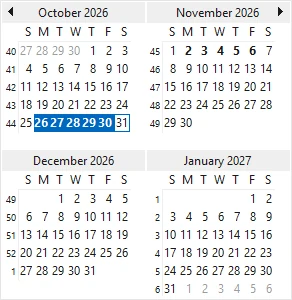
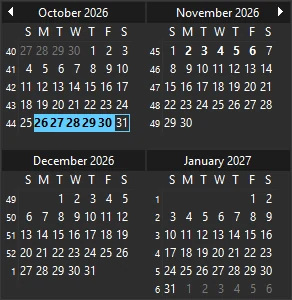
A range of days in a calendar view
SelectedDates holds the selected days. You can also set it to select days in code. With a single day, read CurrentDate.
Use both namespaces in one file
Some type names exist in both namespaces, for example CalendarDayOfWeek, DateRange and TriState. If a file uses Mordex.Windows.DatePicker and Mordex.Windows.Scheduler together, write the full name.
picker.DropDownCalendar.FirstDayOfWeek = Mordex.Windows.DatePicker.CalendarDayOfWeek.Monday;
calendar.FirstDayOfWeek = Mordex.Windows.Scheduler.CalendarDayOfWeek.Monday;
Was this page helpful?