All guides
No guide matches your search.
Show master detail tables and tree rows in the data grid
Show parent and child tables in one MxDataGrid, such as customers with their orders. Or build a tree from one table that has an ID and a parent ID.
On this page
The data grid can show rows inside rows. There are two ways to do it. Master detail uses related tables, and each level has its own columns. A tree uses one table where each row points to its parent.
The examples use using System;, using System.Data; and using Mordex.Windows.DataGrid;.
Show related tables as master detail
Bind the grid to a DataSet that has relations between its tables. Set DataMember to the top table. Then call RetrieveStructure(true), so the grid also builds the child tables.
DataSet sales = new DataSet();
// Fill the Customers, Orders and Lines tables here.
sales.Relations.Add("CustomerOrders",
    sales.Tables["Customers"].Columns["CustomerId"],
    sales.Tables["Orders"].Columns["CustomerId"]);
sales.Relations.Add("OrderLines",
    sales.Tables["Orders"].Columns["OrderId"],
    sales.Tables["Lines"].Columns["OrderId"]);

MxDataGrid grid = new MxDataGrid();
grid.DataSource = sales;
grid.DataMember = "Customers";
grid.RetrieveStructure(true);
Each customer row now has an expand box. When it opens, it shows the orders of that customer. Each order opens to show its lines.
Set up each level
Every level is a GridTable. The top table is RootTable. The tables under it are in ChildTables. Each table has its own columns, caption, totals and row headers.
GridTable customers = grid.RootTable;
customers.Caption = "Customers";

GridTable orders = customers.ChildTables[0];
orders.Caption = "Orders";
orders.Columns["CustomerId"].Visible = false;
orders.Columns["OrderDate"].FormatString = "d";
orders.Columns["Freight"].FormatString = "C2";
orders.Columns["Freight"].AggregateFunction = AggregateFunction.Sum;
orders.Columns["Freight"].TotalFormatString = "C2";
orders.TotalRow = InheritableBoolean.True;
orders.RowHeaders = InheritableBoolean.True;

GridTable lines = orders.ChildTables[0];
lines.Caption = "Order lines";
lines.Columns["OrderId"].Visible = false;
lines.Columns["Total"].AggregateFunction = AggregateFunction.Sum;
lines.TotalRow = InheritableBoolean.True;
Hide the key column in each child table. It repeats the key of the parent row, so users do not need to see it.
With TotalRow on a child table, that level shows its own totals. The grouping guide explains totals.
Build a tree from one table
A tree needs one table with two key columns. One holds the ID of the row. The other holds the ID of its parent. Set HierarchicalMode of the table to SelfReferencing and tell the grid which column is which.
DataTable chart = new DataTable();
chart.Columns.Add("Id", typeof(int));
chart.Columns.Add("ParentId", typeof(int));
chart.Columns.Add("Unit", typeof(string));
chart.Columns.Add("Lead", typeof(string));
chart.Columns.Add("Headcount", typeof(int));
chart.Columns.Add("Budget", typeof(decimal));
chart.Rows.Add(1, DBNull.Value, "Company", "Ana Ruiz", 12, 900000m);
chart.Rows.Add(2, 1, "Sales", "Ben Ford", 40, 2500000m);
chart.Rows.Add(3, 1, "Engineering", "Cleo Park", 55, 4100000m);

MxDataGrid grid = new MxDataGrid();
grid.DataSource = chart;
grid.RetrieveStructure();

GridTable table = grid.RootTable;
table.HierarchicalMode = HierarchicalMode.SelfReferencing;
table.SelfReferencingSettings.ChildDataMember = "ParentId";
table.SelfReferencingSettings.ParentDataMember = "Id";
table.SelfReferencingSettings.ExpandColumn = table.Columns["Unit"];

table.Columns["Id"].Visible = false;
table.Columns["ParentId"].Visible = false;
The names follow a data relation. ChildDataMember is the column that holds the key of the parent row. ParentDataMember is the column that holds the key of the row itself.
ExpandColumn is the column that shows the expand box and the indent. Without it, the grid uses the first visible column.
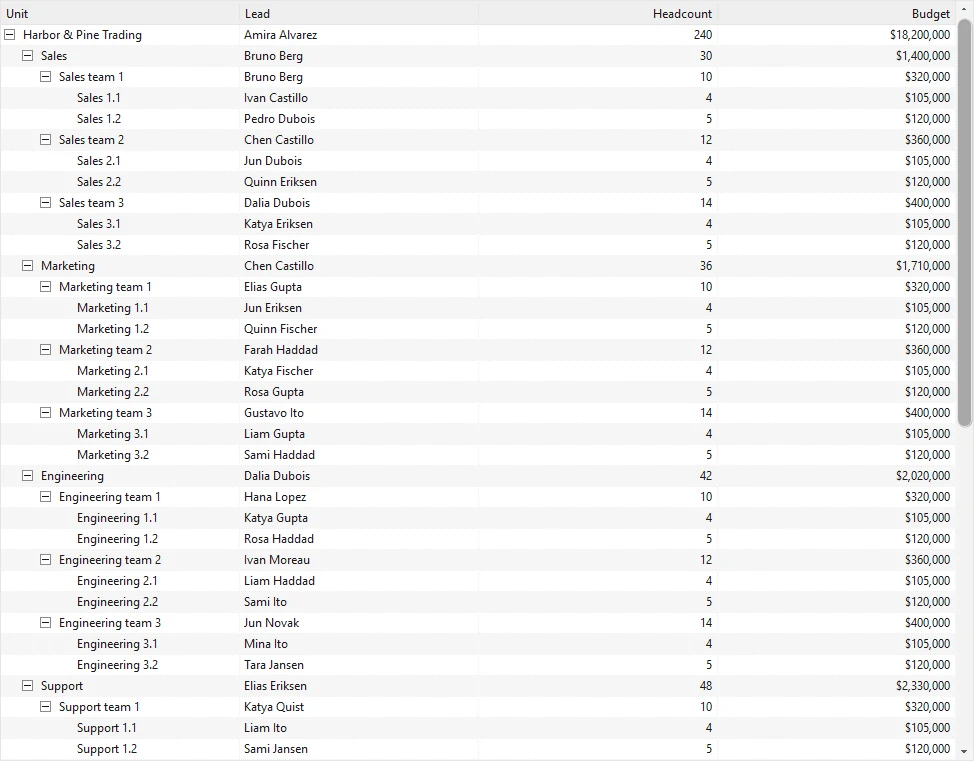

Tree rows
Choose the top level rows
ParentRootMode decides which rows are at the top of the tree.
| Value | Top level rows |
|---|---|
NullValue | Rows with an empty parent key. This is the default. |
SelfReferencingNode | Rows whose parent key is equal to their own key. |
UseParentRootValue | Rows whose parent key is equal to ParentRootValue. |
Set TreatOrphanRowsAsRoot to true to show rows whose parent is missing at the top level.
table.SelfReferencingSettings.ParentRootMode = ParentRootMode.UseParentRootValue;
table.SelfReferencingSettings.ParentRootValue = 0;
table.SelfReferencingSettings.TreatOrphanRowsAsRoot = true;
Add totals to a tree
Set AggregateFunction on the columns and turn on the total row. AggregationMode sets which rows the totals add up.
SelfReferencingAggregationMode.AllRowsadds up every row in the tree. This is the default.SelfReferencingAggregationMode.RootRowsadds up only the top level rows.
table.Columns["Headcount"].AggregateFunction = AggregateFunction.Sum;
table.Columns["Budget"].AggregateFunction = AggregateFunction.Sum;
table.Columns["Budget"].TotalFormatString = "C0";
table.TotalRow = InheritableBoolean.True;
table.SelfReferencingSettings.AggregationMode = SelfReferencingAggregationMode.RootRows;
Use RootRows when each parent row already holds the sum of its children. Then the total does not count the same values twice.
Open and close rows
These methods work for master detail and for trees.
grid.ExpandRecords();            // open every level
grid.ExpandRecords(customers);   // open the rows of one table
grid.CollapseRecords();          // close every level
To open one row, set Expanded on it. GetChildRecords returns the child rows of a row.
GridRow[] top = grid.GetRows();
if (top.Length > 0)
{
    top[0].Expanded = true;
    GridRow[] children = top[0].GetChildRecords();
}
The grid raises ExpandingRow and CollapsingRow before a row opens or closes. Set e.Cancel to true to stop it. RowExpanded and RowCollapsed follow.
Change the look of the tree
TreeLines draws lines that join the rows. It is on by default. HierarchicalExpandBoxStyle sets the style of the expand box, for example Classic or Arrows.
grid.TreeLines = true;
grid.HierarchicalExpandBoxStyle = ExpandBoxStyle.Arrows;
Was this page helpful?